> For the complete documentation index, see [llms.txt](https://enterprise-ua.hideez.com/llms.txt). Markdown versions of documentation pages are available by appending `.md` to page URLs; this page is available as [Markdown](https://enterprise-ua.hideez.com/mobilnii-zastosunok-hideez-authenticator/nalashtuvannya-hideez-authenticator-dlya-administratoriv/nalashtuvannya-dlya-autentifikaciyi-u-robochu-stanciyu-windows/nalashtuvannya-dlya-vkhodu-v-robochu-stanciyu-bez-parolya/nalashtuvannya-servera-hideez-dlya-bezparolnogo-vkhodu-u-robochu-stanciyu-active-directory-on-prem.md).
# Налаштування сервера Hideez для безпарольного входу у робочу станцію Active Directory On-Prem
Після того, як ви створили відповідний шаблон в центрі сертифікації, вам потрібно виконати наступні налаштування:
1. Ім'я постачальника криптографічних послуг
2. Конфігурація сертифіката
3. Ідентифікатор Шаблону сертифіката
Перший параметр (**Ім'я постачальника криптографічних послуг**) повинен мати значення "Microsoft Base Smart Card Crypto Provider".
Другий параметр (**Конфігурація сертифіката**) - це ім'я контролера домену та ім'я центру сертифікації, розділені символом "\\". Наступна команда допоможе визначити ці імена:
```
certutil -config - -ping
```
Запустіть її в командному рядку, після чого ви отримаєте таке вікно:
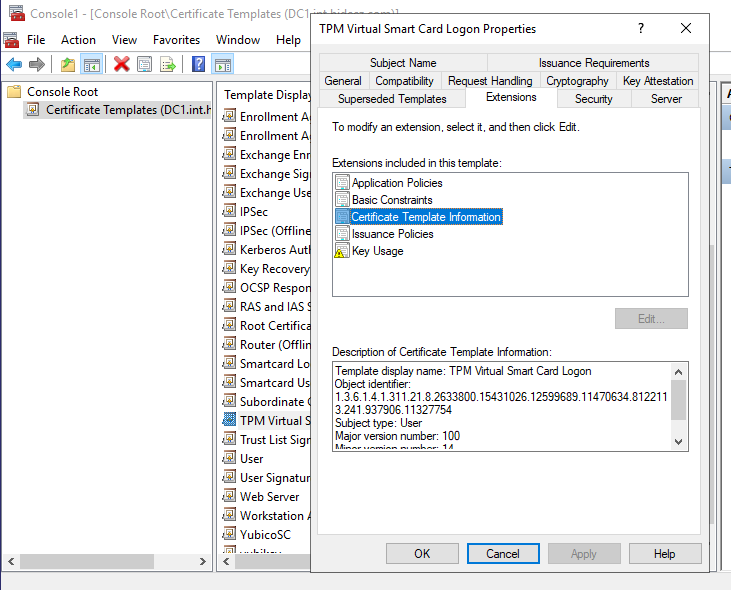
Щоб визначити третій параметр (**Ідентифікатор шаблону сертифіката**), перейдіть до контролера домену і виконайте такі дії:
* Відкрийте MMC і додайте **Шаблони сертифікатів оснастки** (Файл > Додати/Видалити оснастку > Шаблони сертифікатів)
* Натисніть правою кнопкою миші на створеному шаблоні сертифіката
* Відкриті **Властивості**
* Відкрийте вкладку **Розширення**
* Виберіть **"Інформація про шаблон сертифіката"**
Ідентифікатор з'явиться в описі нижче після **"Ідентифікатор об'єкта"**:

Отримані параметри потрібно внести в налаштування сервера HES. Для цього перейдіть в **Налаштування -> Параметри -> Active Directory**. [Додайте параметри в налаштуваннях HES серверу](https://enterprise.hideez.com/hideez-enterprise-server/administration/setting-hes-server-parameters#domain), а потім відредагуйте **Налаштування безпарольного входу на робочу станцію**:
.jpg)
Введіть і збережіть отримані раніше налаштування.